Part 10 - Aspiration Tuning

Today we’ll cover only main Aspiration Tuning used within aspirations. There are few other types, e.g. for career assignments, but I think once you get the concept, everything else will be then more intuitive.
Also, since my previous tutorials was put very simply, to make sure everyone gets the idea, I think there is no need anymore for such detailed explaining. So from now on, I will probably explain things less and less meticulously. But let me know if something is not clear.
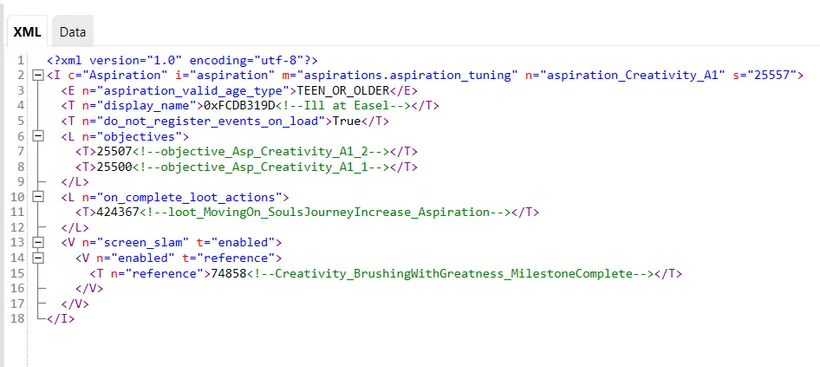
Aspiration tuning in aspirations is in other words - aspiration level. Tuning file looks like this (it’s painter aspiration, 1st level):
Aspiration Tuning structure
Section titled “Aspiration Tuning structure”-
Aspiration valid age type - this defines for which age group this aspiration will be visible. There are only 3 possible options here:
- CHILD_ONLY
- TEEN_ONLY
- TEEN_OR_OLDER
- (There’s also TODDLER_ONLY but toddlers can’t have aspirations like this).
-
Display name - this is name of this particular aspiration level.
-
Do not register events on load
When set to True, it will start “checking” the task only when the aspiration in active.
When set to False - it will check towards the aspiration, even when your Sim has currently different aspiration chosen.
-
Objectives - these are tasks to be done within aspiration. I never checked how many objectives you can have max within 1 aspiration level, but UI will only show correctly up to 4. Everything above 4 will not be visible from Simology panel.
-
On complete loot actions - here you can add what happens upon completing this particular aspiration level. The one that is listed is responsible for increasing the path bar towards Souls Journey. But you can add your own too! For example, with this mechanism you could add a buff, when a Sim completes an aspiration level. Or maybe even a bonus, like skill increase, or money or something else. You can also entirely delete this section if you want.
-
Screen slam - I don’t know if I can explain it well :D So this is this aspiration icon enlarged that is popping on the screen when we complete an aspiration level. This:

SimData
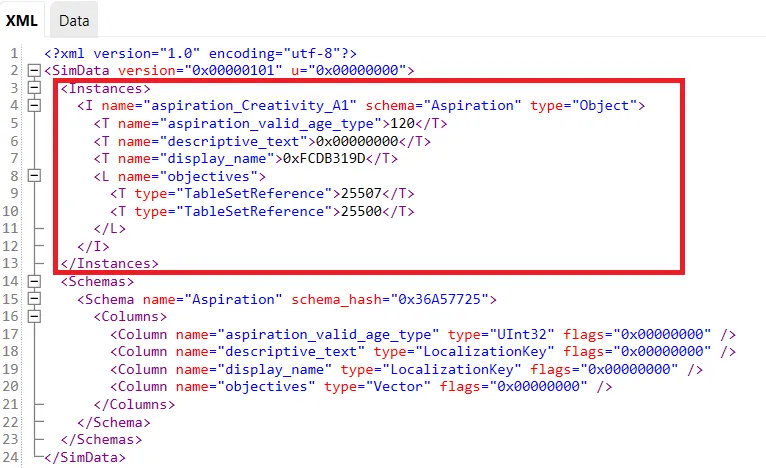
Section titled “SimData”And now a look on SimData. We only modify values within the red frame.
-
Aspiration valid age type is here represented by number 120, which corresponds with TEEN_OR_OLDER.
- 4 is for CHILD_ONLY
- 8 is for TEEN_ONLY
If you don’t know what to use here, just check the game file that should have correct number.
-
Descriptive text is 0x00000000 because there is no description defined for Aspiration level.
Creating your own Aspiration Tuning
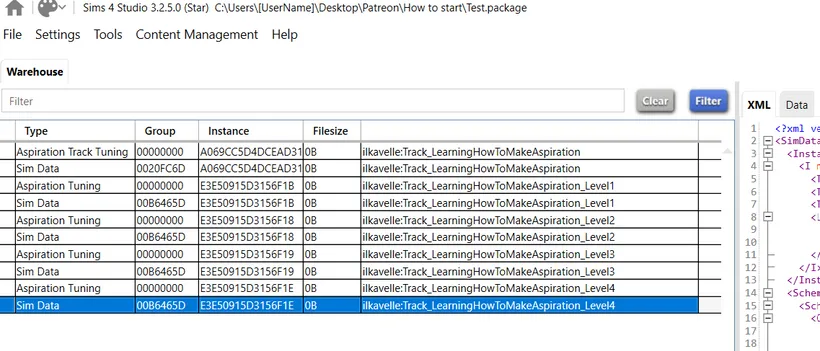
Section titled “Creating your own Aspiration Tuning”Now create your own 4 aspiration levels. If you don’t know how, go to Modding basics.
Make sure Tuning file and SimData file for each Aspiration Level has the same Instance, TuningId and Name.
I have this outcome now:
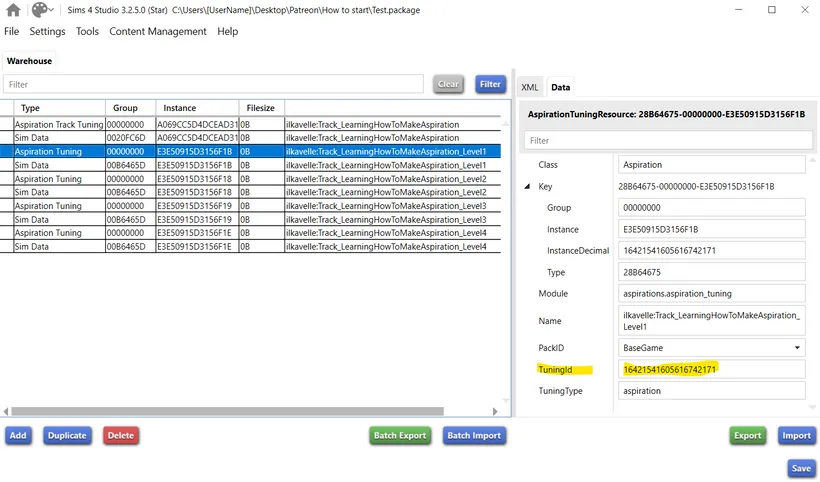
Now, take tuningId of each aspiration tuning created and put it correctly in a created previously Aspiration Track Tuning AND SimData.
Final notes and tips - Local Tunings
Section titled “Final notes and tips - Local Tunings”You don’t need to check TuningId the way I showed above, actually. There’s faster way in S4Studio. When you’re at Aspiration Track tuning, go to Local at the bottom (marked on green). There you’ll see all the tuning used within your package. You can copy values from there:
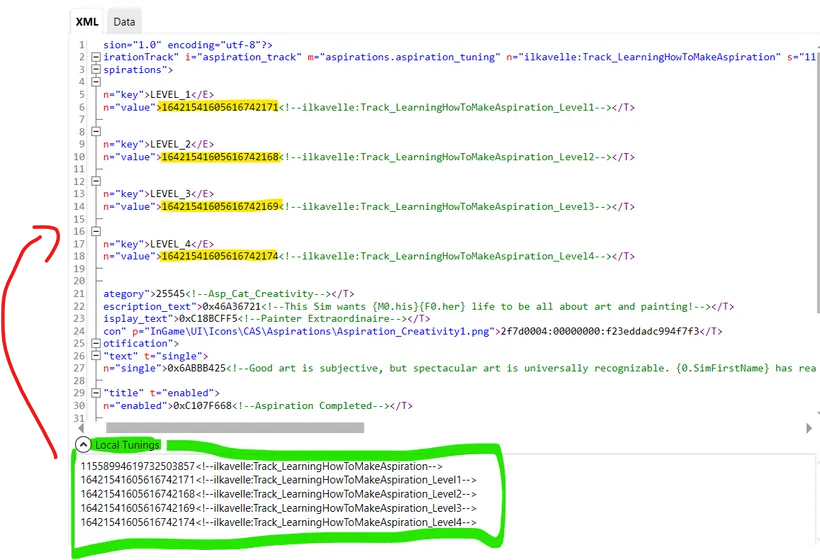
And of course, do not forget about Sim Data!
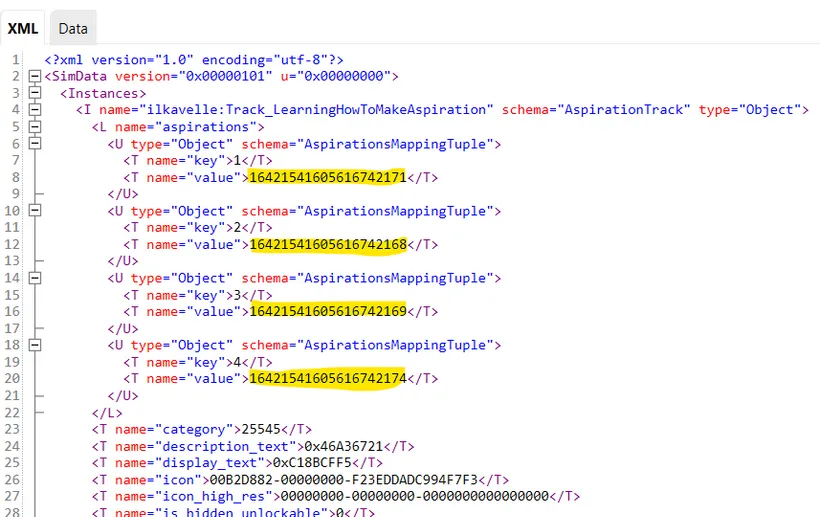
That’s all for today! I hope this was easy to follow :)
Ask me any question regarding today topic. I’ll try to reply tomorrow or within next days :)
Back to Part 9 Back to the index On to Part 11
Originally posted on ilkavelle’s Patreon as part of her Simsmas Modvent Calendar, and collected in the Mod It Yourself series, where you can ask questions in the comments.