Part 12 - Objective Tuning

Today we finally start discussing Objective Tuning - so that you can create various tasks for your aspirations.
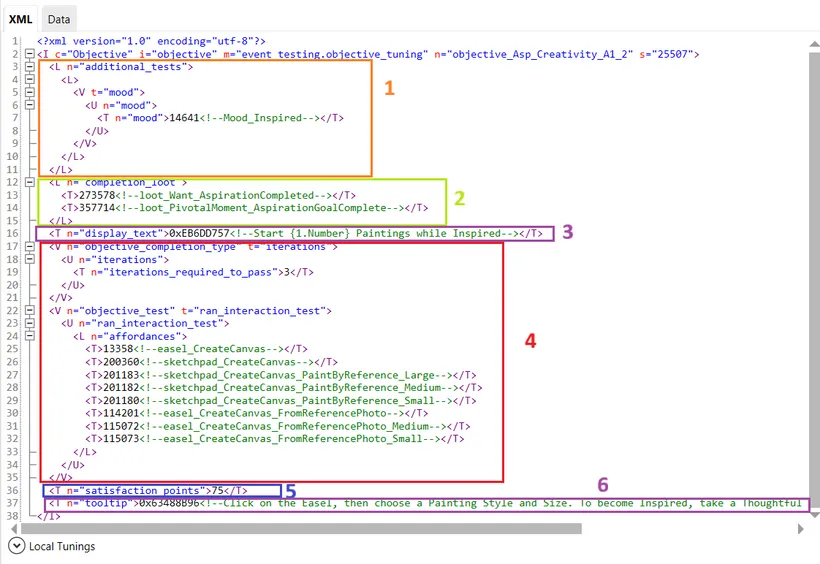
First let’s take a look at the Tuning file structure.
-
Additional test - It is optional. Entire section can be deleted. It’s sometimes very useful to set up additional test, but it all depends on what you want to achieve.
-
Completion loot - Here you can add what happens upon completing this particular objective. It’s the same as in Aspiration tuning. So for example, you could add a buff, when a Sim completes an objective. Or something else. The 2 things listed in this objective are common for all objectives, so I always keep them.
-
Display name - this is obvious.
-
Objective completion type AND Objective test - During next days I’ll present how to create various objective tests.
-
Satisfaction points - This is the value how many satisfaction points your Sim gets upon completion of an objective.
-
Tooltip - this one is also obvious.
SimData structure
Section titled “SimData structure”In SimData you actually only put Display name, Satisfaction points and Tooltip:
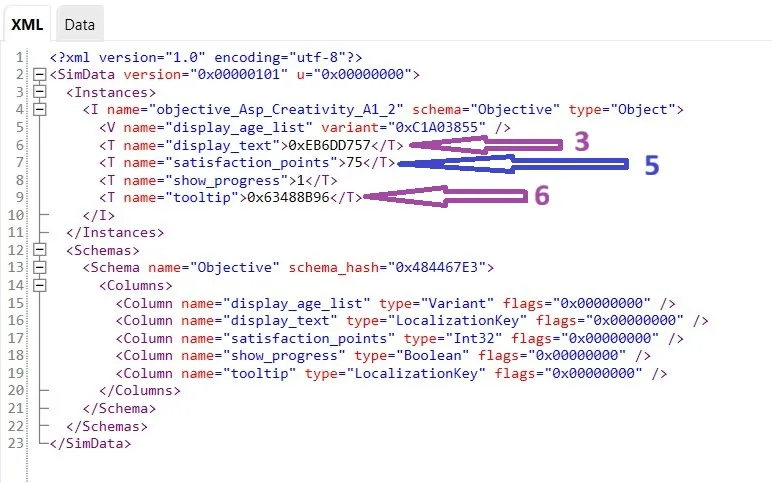
Once you create your own Objective Tuning and its corresponding SimData, you need to place their TuningIds in Aspiration Tunings and their SimData.
Next I’ll show different types of Objectives tests. :)
Back to Part 11 Back to the index On to Part 13
Originally posted on ilkavelle’s Patreon as part of her Simsmas Modvent Calendar, and collected in the Mod It Yourself series, where you can ask questions in the comments.