Part 17 - Reward Tuning
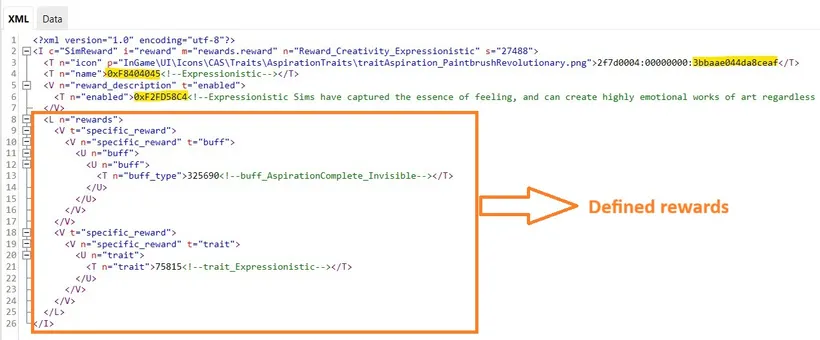
In Reward Tuning you need to define:
- Icon
- Name (of the reward)
- Reward description
- Reward itself - it can be actually various things. In aspiration, traits are commonly used as rewards, but it doesn’t need to be trait. It can be some object. Something from CAS unlocked. It can be just money. I will show few examples in the next tutorial.
What I noticed about the aspirations from the game - in their Reward Tuning the icon, name and description is the same that icon, name and description of the trait that will be given. I didn’t always follow this pattern, so it’s not mandatory.
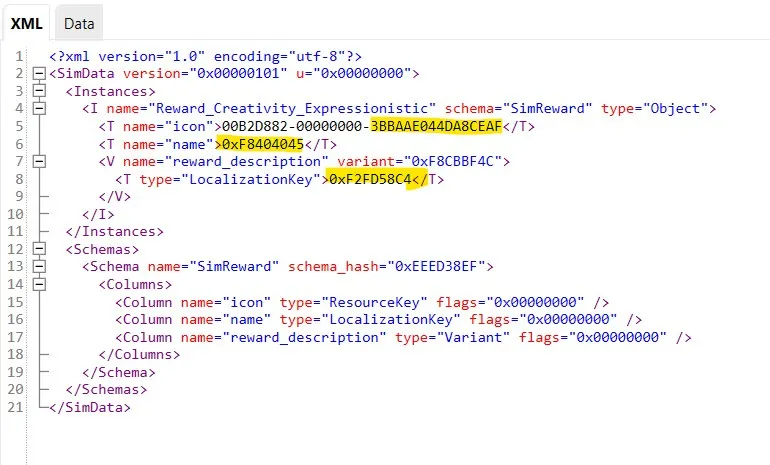
SimData structure
Section titled “SimData structure”Here you only define the icon, name and description of the reward:
Creating your own Reward Tuning
Section titled “Creating your own Reward Tuning”For this first aspiration I propose to define as reward something already existing in the game. It can be a trait from Reward Store, or a trait that is a reward for other aspiration. I would love to explain to you how to make your own trait, but our Simsmas Modvent Calendar time is running out, so maybe next time :)
Once you create your own Reward Tuning and its corresponding SimData - don’t forget to put its TuningId in Aspiration Track Tuning (and its SimData). If you don’t remember where - go back to tutorial about Aspiration Track Tuning.
Back to Part 16 Back to the index On to Part 18
Originally posted on ilkavelle’s Patreon as part of her Simsmas Modvent Calendar, and collected in the Mod It Yourself series, where you can ask questions in the comments.